My Post-Wedding Photography Workflow with Aftershoot
If there’s one thing I’ve learned as a wedding photographer, it’s that the workflow behind the scenes matters almost as much as the photos themselves. A smooth culling, editing, retouching, and delivery process means faster delivery times, less burnout, and more energy for creativity. And that’s exactly why Aftershoot has become such a huge part of my workflow.
As a destination wedding photographer, educator, and business owner, our time is constantly divided between shooting, traveling, teaching, creating content, answering emails, and actually trying to have a life outside of work. I used to spend endless late nights sorting through thousands of nearly identical images and then editing and re-editing until I got the images just right.
Here’s how I use Aftershoot to streamline my workflow while still keeping our storytelling images and editing style.
Step 1: Import and Backup
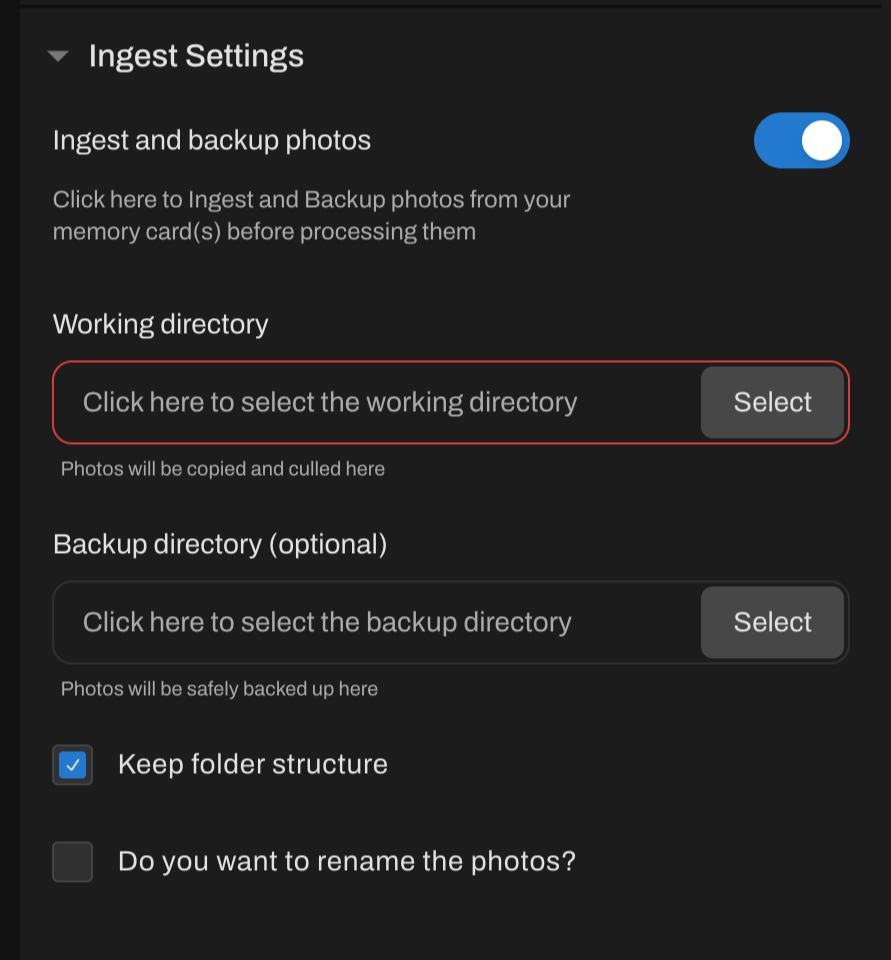
The second we get home from a wedding, the first priority is backing up every image. As you know, we immediately create multiple backups before touching anything else. You can ingest AND make back up copies right in Aftershoot in the import menu. No need to waste time copying into a folder and then opening in the program.
This is honestly where the magic starts.
Step 2: AI Culling That Still Feels Personal
One of the biggest misconceptions about AI culling is that it removes the human side of photography. For me, it’s actually the opposite.
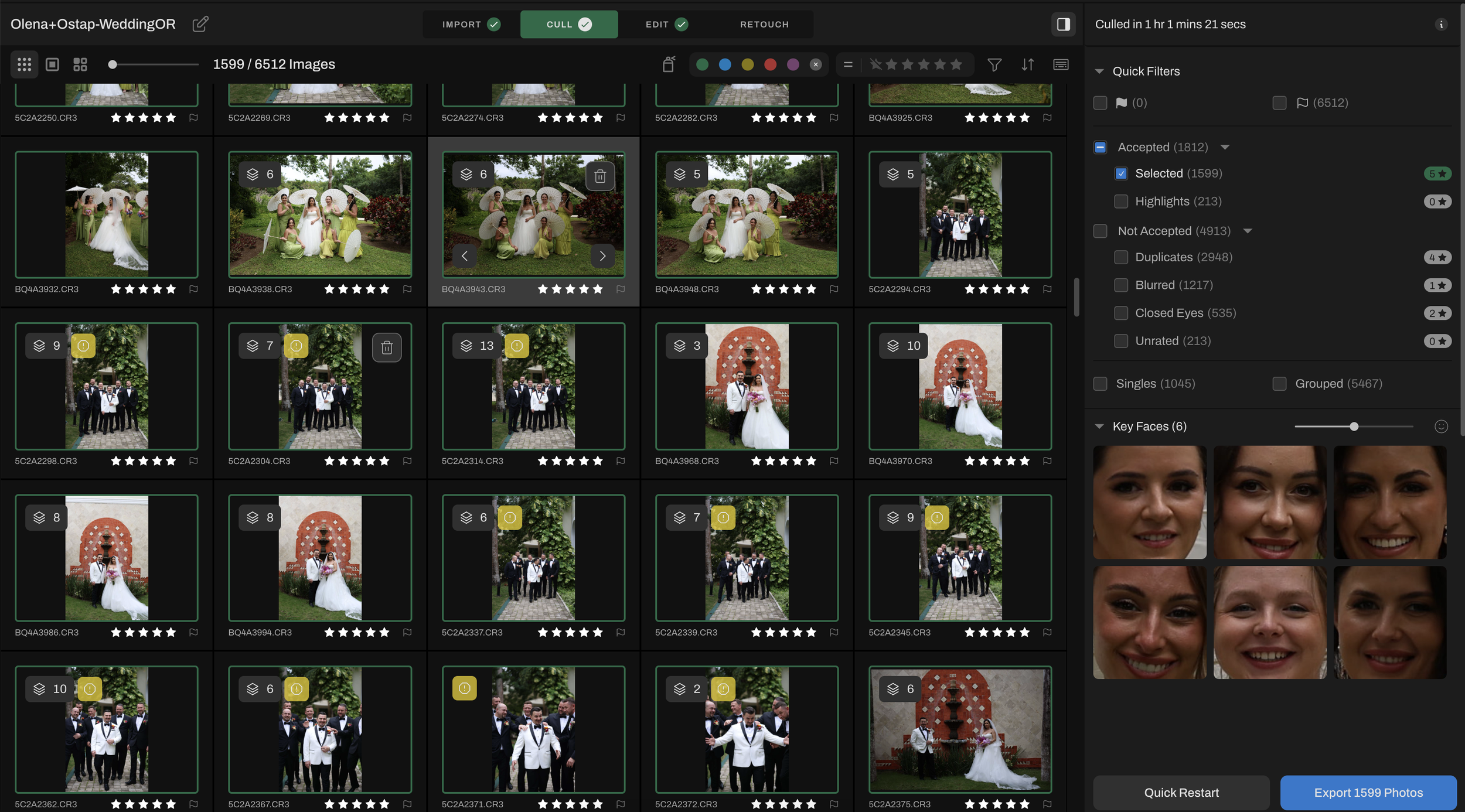
Aftershoot helps eliminate duplicates, closed eyes, missed focus, and those in-between test shots that naturally happen during a wedding day. Instead of spending hours filtering through thousands of images manually, we can focus our energy on the moments that actually matter.
The best part? We’re still making the final creative decisions.
The emotional moments, storytelling choices, composition preferences, and artistic selections are still entirely ours, Aftershoot simply gets us to those moments faster.
For wedding photographers shooting massive galleries, this can literally save days of work every month.
Step 3: Editing Faster without Losing My Style
Consistency is one of the hardest parts of wedding photography editing, especially during busy season.
Using Aftershoot for AI editing allows me to build a custom profile based on our own style and preferences instead of relying on generic presets. That means our galleries still feel cohesive, intentional, and true to our brand.
If you want to use an existing profile you can find one in the marketplace, some amazing photographers have their editing style available for purchase, like my boyfriends profile “Leo”. If you’re looking for a free profile, I love the “Editorial” one.
Rather than starting every image from scratch, Aftershoot gets the images 90% of the way there!
So instead of feeling drained before we even begin the artistic part of editing, we can spend more time fine-tuning images and delivering a stronger final gallery to our couples.
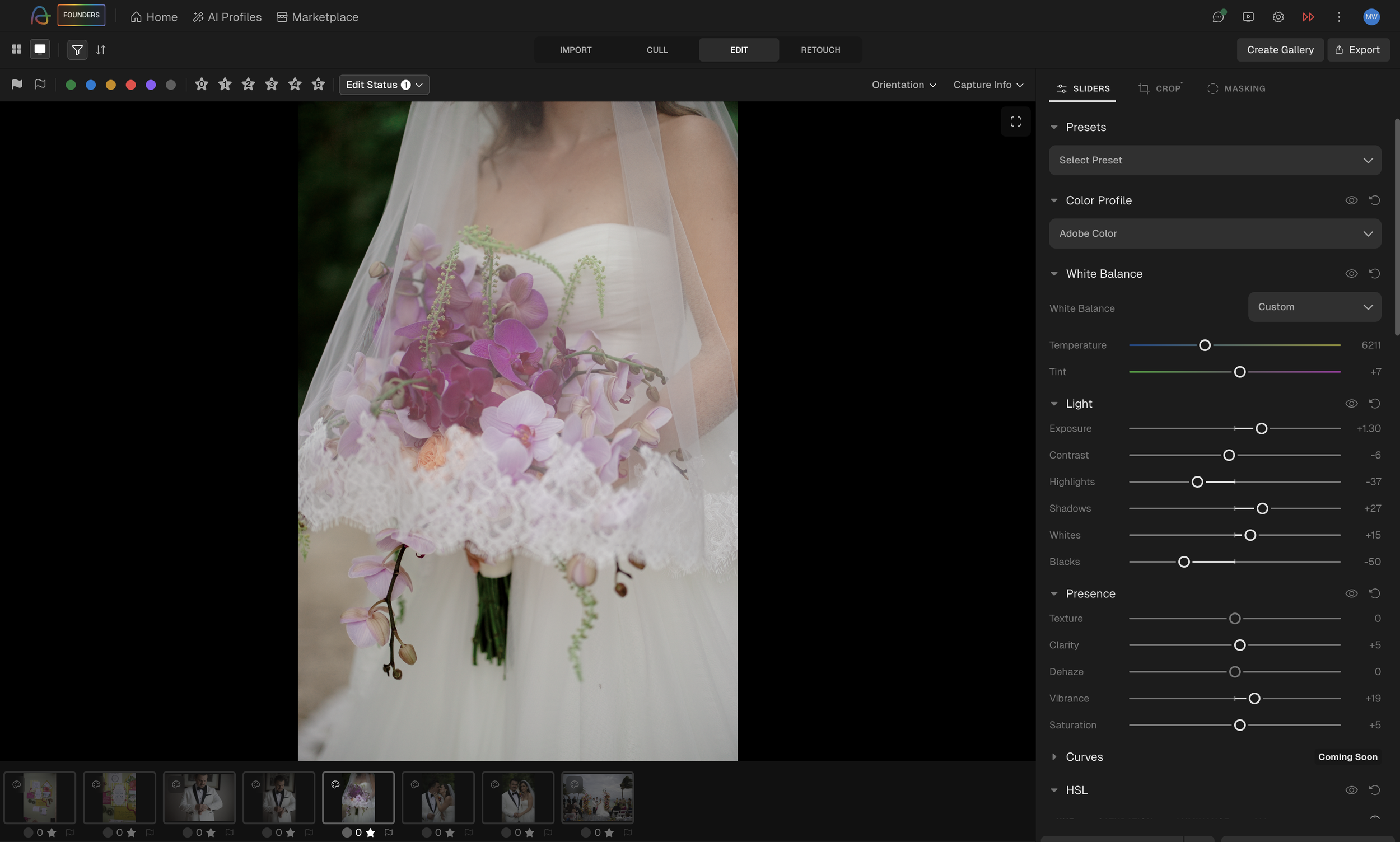
Step 4: Adjust in Aftershoot (Not in Lightroom)
YES! You read that right! No more need for One of the newest features I’m especially excited about with Aftershoot is the addition of manual editing adjustments directly inside the platform. That means photographers can now fine-tune edits without constantly jumping back and forth between programs like Lightroom or Capture One for smaller adjustments and refinements. You can adjust sliders for white balance, light, HSL, and so much more!
For workflow efficiency, this is a huge step forward!
You can even upload your existing Lightroom presets right into the Aftershoot editing software.
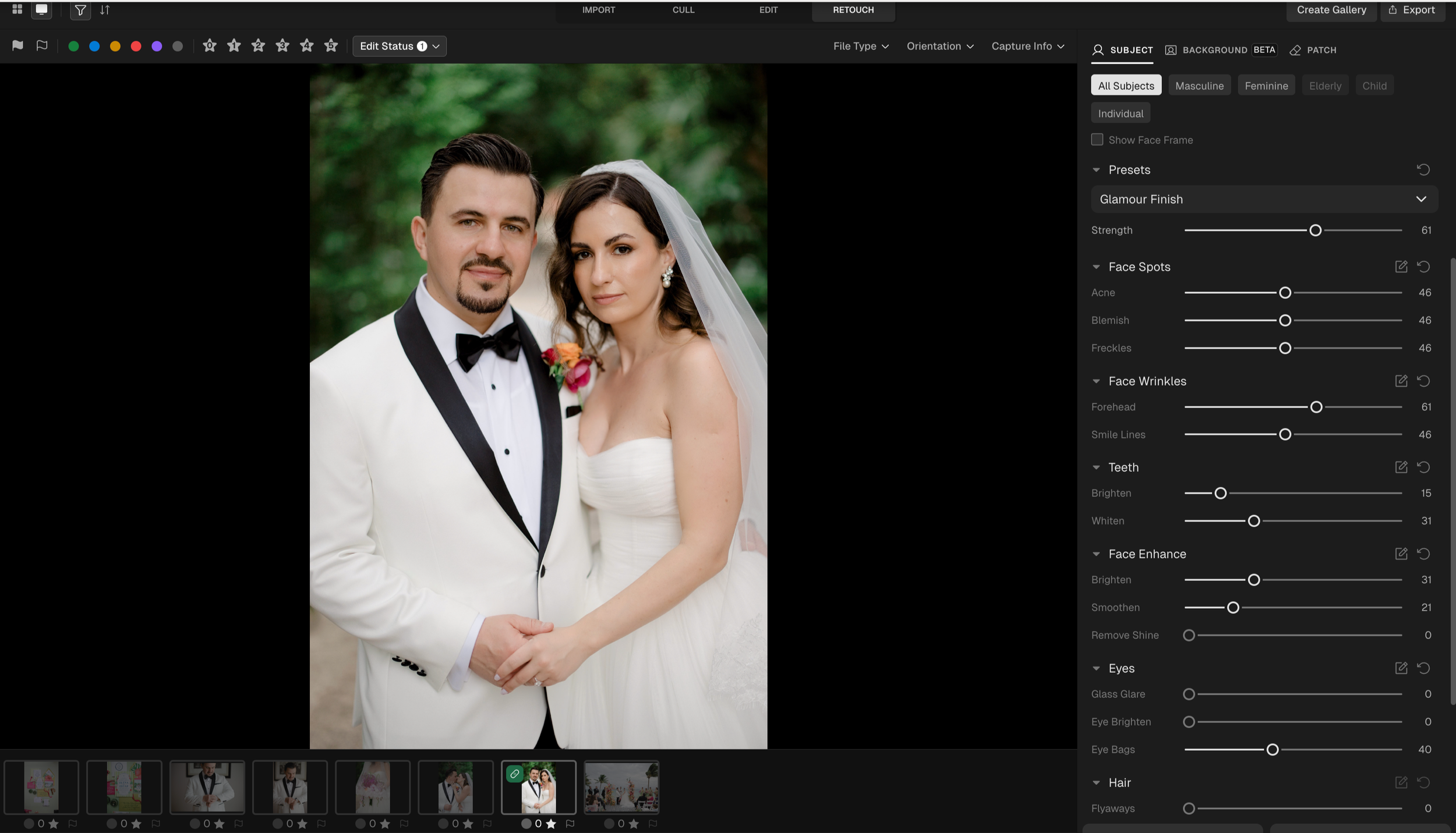
Step 5: Better Images for the Client With Retouching
Instead of moving images through multiple retouching programs or even paying to outsourse, photographers can now handle many common adjustments within the same ecosystem they’re already using for culling, editing, and delivery. Keeping more of the workflow centralized creates a smoother and far less fragmented editing experience. Besides retouching skin and brightening eyes, Aftershoot can smooth clothing wrinkles, take glare out of glasses, and even remove background distractions.
As photographers, especially in weddings and fast-paced events, there are so many moments where perfect conditions just aren’t realistic. Sometimes a light stand ends up reflected in a mirror, a distracting exit sign pulls attention from the moment, or an object in the background takes away from an otherwise incredible image. Traditionally, those fixes meant exporting files into additional retouching software and adding even more steps to the editing process.
Having these kinds of cleanup and distraction-removal tools integrated directly into Aftershoot creates a much smoother workflow from start to finish. Instead of bouncing between multiple programs, photographers can cull, edit, retouch, and refine images in one connected space.
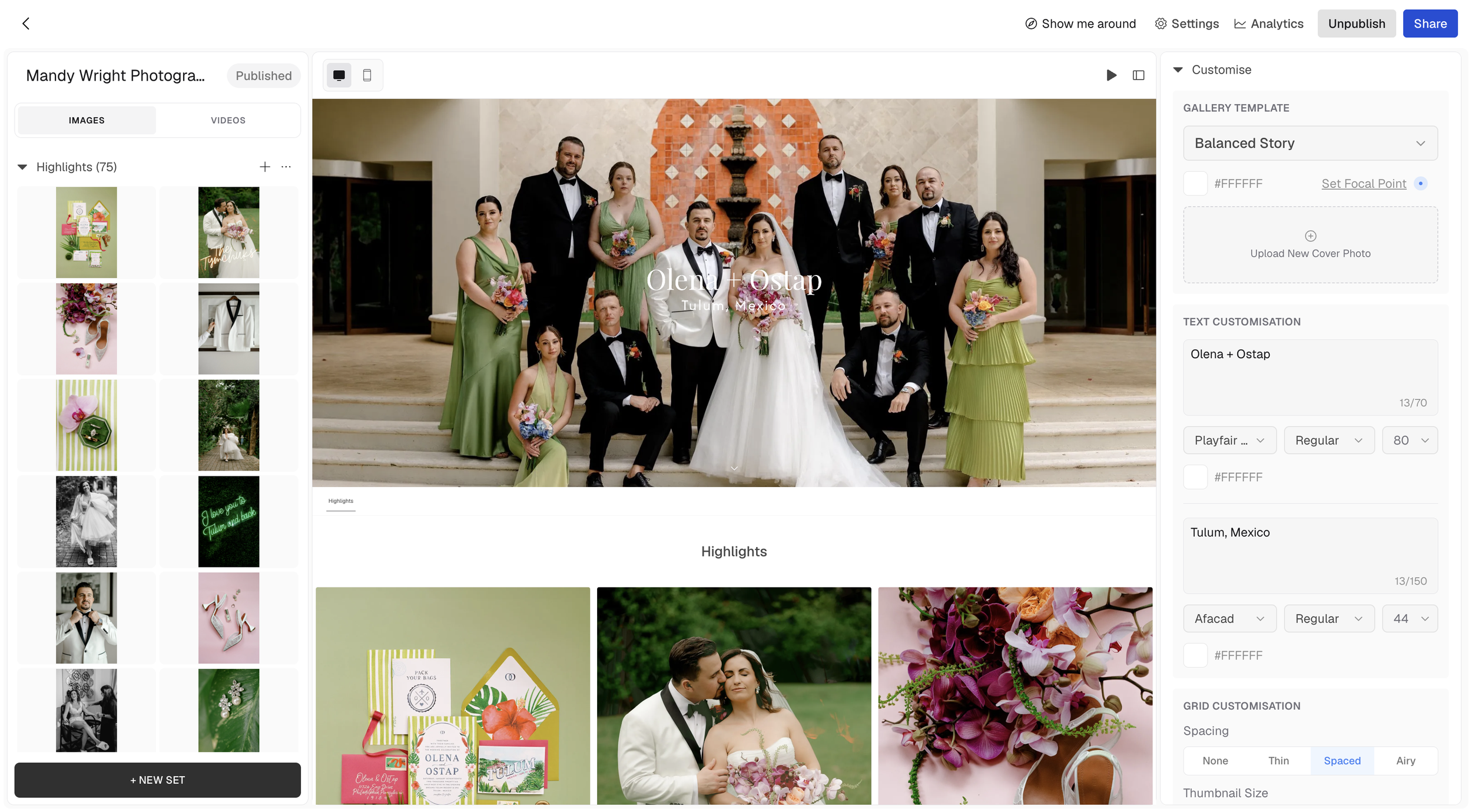
Step 6: Gallery Delivery Right From Aftershoot
No need to export to a folder and upload to a seperate gallery service, you can upload to a gallery right in Aftershoot.
That means less time managing uploads, file transfers, exports, and duplicated organization systems and more time focused on creating and serving clients well.
For photographers juggling high-volume wedding seasons, destination travel, and fast turnaround expectations, having gallery delivery integrated directly into the workflow can make the entire process feel far more efficient and cohesive.
Workflow Matters More Than Ever!
Wedding photography is more demanding than most people realize. Clients want their images yesterday. Long wedding days, travel schedules, content creation, business management, editing marathons, it adds up quickly.
Creating a workflow that protects your creativity is essential.
For me, Aftershoot has helped reduce burnout, improve turnaround times, and free up more time for the parts of photography we actually love most; connecting with couples, creating art, traveling, and telling meaningful stories.
Technology should support photographers, not replace them… and finding tools that genuinely improve your quality of life behind the scenes can completely transform your business.
It’s exciting watching photography software evolve beyond single-purpose tools into platforms that support nearly every stage of the client experience from start to finish.